Design and Style tabs
Content in one tab, the look in the other.
Webyaam for
Design every detail, without a ticket.
Shape every block in the Design and Style tabs, keep the site on brand with variables, and set each breakpoint yourself.
Your toolkit Scroll →
A real look at designers in the builder. Scroll to explore.
Click any block. It gets a selection outline and a quick toolbar right where you are working.
Every section, stack and element as a tree. Selection stays in sync with the canvas.
Three tabs for each block: what it says, how it is laid out, and how it looks.
Switch between desktop, tablet, landscape and mobile before you change a value.
The Variables workspace listing brand colors with their CSS custom properties.
Colors, sizes, fonts and numbers, each with its own list.
Names like Brand/Ink keep large systems organized.
Each variable becomes a --wy-* property you can bind in the Style tab.
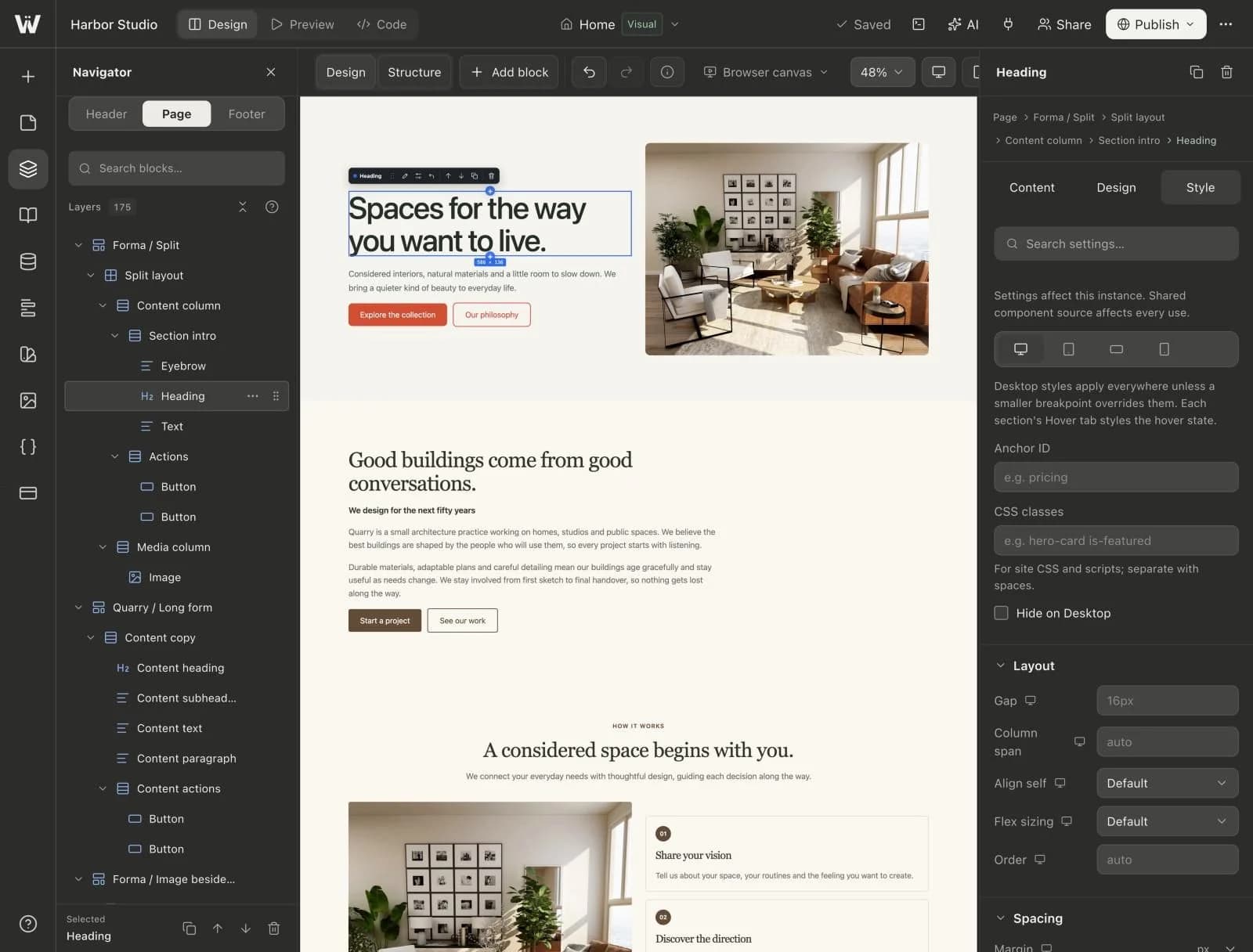
Real screenshots of the Webyaam builder with a demo site.
01 What you get
Content in one tab, the look in the other.
Colors, sizes, fonts and numbers shared across the site.
Desktop, tablet, landscape and mobile.
More than 900 finished sections to reshape.
02 How it works
Or a blank page.
Style every block and screen size.
Live in one step.
Your next website starts here
Start free in the builder. Your first site gets a 7-day trial with Grow features, no credit card needed.