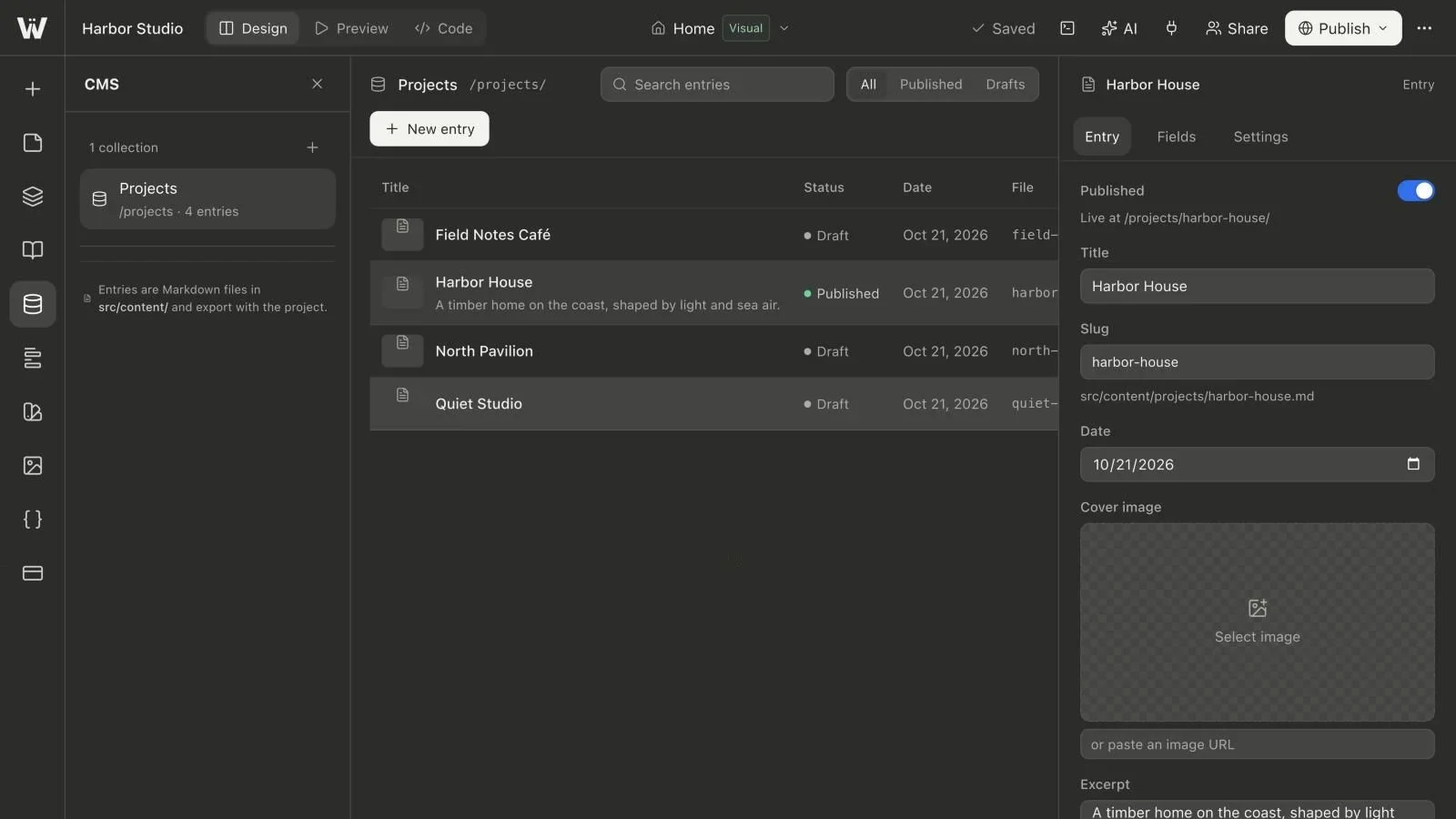
“I saved the post, but it is not on the website” usually describes a state mismatch rather than missing content. In a file-based Astro workflow, editing an entry, marking it as publishable and releasing a new website build are different operations.
Understanding those boundaries makes a CMS easier to use. It also prevents an unfinished entry from being mistaken for public content, or an old published snapshot from being mistaken for a failed save.
The four states worth distinguishing
In Webyaam, consider these checkpoints:
| Checkpoint | What it establishes | What it does not establish |
|---|---|---|
| Input entered | A control shows the value you typed | That the whole project has been saved |
| Source saved | The project contains the entry and its values | That a new static build has been produced |
| Entry marked Published | The entry is eligible for the generated published content | That visitors already receive a new snapshot |
| Site published | A selected build is released to the site's visitors | That an unverified custom domain is necessarily active |
This is a practical workflow model, not a claim that every CMS uses the same terminology. Always check the status shown by the product you are using.
What Draft means in Webyaam's collections
Entries have a draft flag in their Markdown frontmatter. Webyaam's generated collection lists and detail routes exclude draft entries from published output. You can use drafts for incomplete writing, missing imagery or content awaiting review.
For example:
---
title: "A project still being reviewed"
date: 2026-10-31
draft: true
---

This body can be developed before the entry is included in the public site.
Draft is an editorial state, not a secure document-sharing mechanism. An editor or assistant authorized to read project source may still read the file. Do not put secrets, confidential client material or credentials into draft content on the assumption that the flag creates a private vault.
Complete required fields before changing the status
A collection can require custom values on published entries. This makes a missing author, category or other essential field visible before the build depends on it. Drafts can remain incomplete while the editor works.
A required field means that the expected value is present. A number of zero is still a number. A switch set to false is still a boolean value. If your business rule requires a positive price or an explicit acknowledgement, that is a more specific validation rule than a generic Required setting.
If publication is rejected, read the field name in the message, fill the value and try again. Do not remove the required rule merely to silence a problem unless the content model genuinely needs to change.
Use an entry's date for the purpose you defined
An entry date can organize or label content. Do not assume that setting it to a future date schedules an automatic release. Webyaam's generated collection workflow uses the draft flag to determine whether an entry is included; the date field is not a scheduled publishing service.
If you need publication at a particular time, arrange an explicit release workflow that changes the content status and builds or publishes the site at that time. Document who owns that process. A field called publishDate is still only data until something implements the scheduling behavior.
Save the source and verify persistence
After editing, let the save complete and review any error or conflict message. During initial setup, reload once and confirm that the entry body and custom fields are still present. This is especially useful when training a client who is unfamiliar with the difference between changing a control and completing a save.
If another editor or assistant saved a newer revision, resolve the latest project state before continuing. A stale revision rejection is a protection against overwriting someone else's work, not a reason to repeatedly submit the same old copy.
Build and inspect the intended output
Build the project after the source and content statuses are correct. Inspect a collection list and a detail page. Check the entry's title, image, excerpt, body and any fields the layout displays.
If the build fails, keep the error separate from the question of whether the entry was saved. A source file can be safely stored even when the project cannot currently compile. Missing dependencies, schema problems and occupied development sessions are different failures and should be handled differently.
A preview is also different from a public release. Use it to review the next version, then deliberately publish the build that passed your checks.
Unpublish without assuming the old snapshot disappears instantly
To remove an entry from future generated output, switch it back to Draft, save and produce a new build for publication. Until the updated build is released, the previously published static site may still contain the old page.
If a public URL is being retired permanently, decide whether it should redirect to a relevant replacement or return a missing-page response. A collection status control is not a substitute for that URL decision. Do not redirect every removed article to an unrelated home page just to avoid seeing a 404.
After publication, test the actual public URL and the listing. Also inspect the public navigation and sitemap behavior used by your site; a content change should not leave prominent links pointing at a removed entry.
Write a release checklist for editors
A small team can use a short checklist: content complete, required values filled, source saved, preview checked, correct build published and public URLs verified. Assign ownership of the final release rather than assume that every person editing a paragraph should publish the whole site.
For a portfolio example, follow building a portfolio with collections. For the initial schema setup, read adding a CMS to Astro. The Astro CMS hub connects the complete editorial workflow.